 |
Support for Q-SYS Core 110f |
|
Support for Q-SYS Core 110f |
|
Liberty Support for the Q-SYS Core 110f The Liberty Recorder supports the use of the Q-SYS Core 110f to capture audio from microphones, and to playback audio from the Recorder into the room. Review the following configuration steps to configure both the Core 110f and the Liberty Recorder. Configure the Q-SYS Core 110f Step one is to configure a simple Q-SYS environment for testing. In the configuration below, all 8 microphone signals are sent to the PC via the USB, and a 4 channel USB block directs audio from the PC to output channels on the Core 110f. 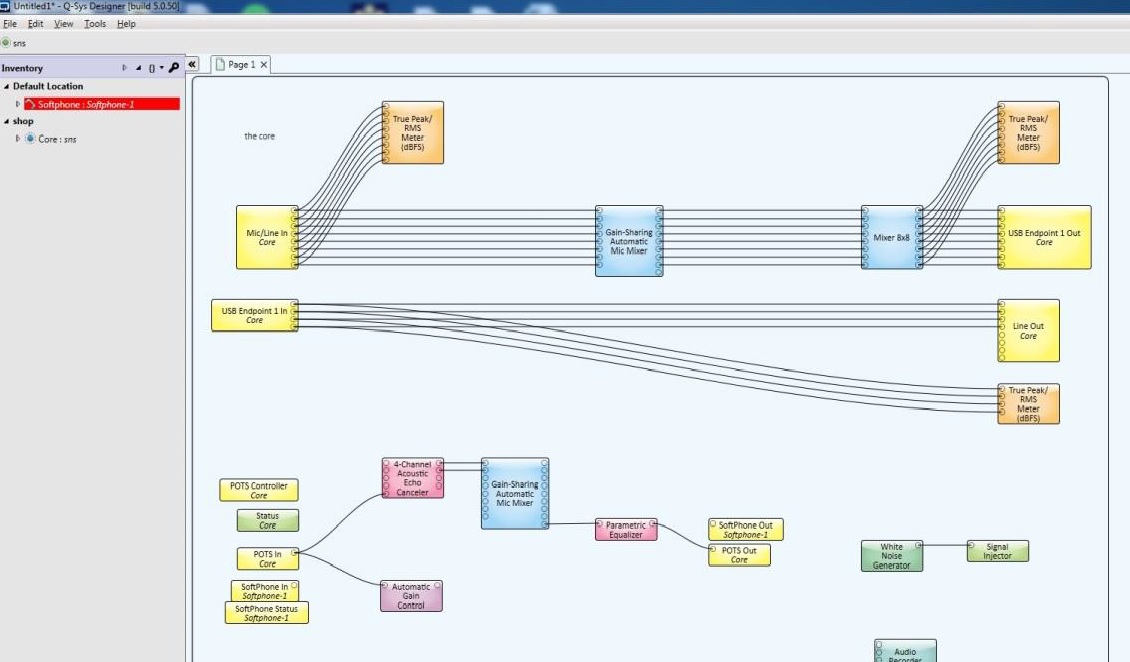
Configure the Microphone Input in Liberty Court Recorder Next, in the Recorder options, configure the Recorder to accept the audio inputs from the Core 110f. In the options on the "Audio and Recording" tab, specify the "Type of Driver" (usually Wave) and then the Core 110f device used for each of the recording channels. 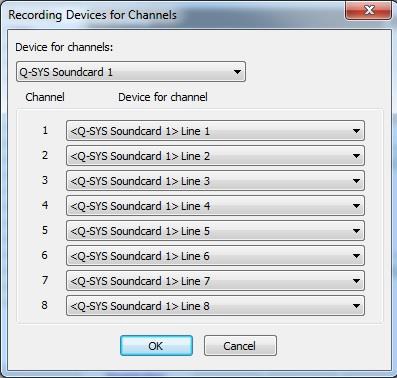
Finally, if applicable, assign audio output channels from Liberty Court Recorder to the Core 110f. 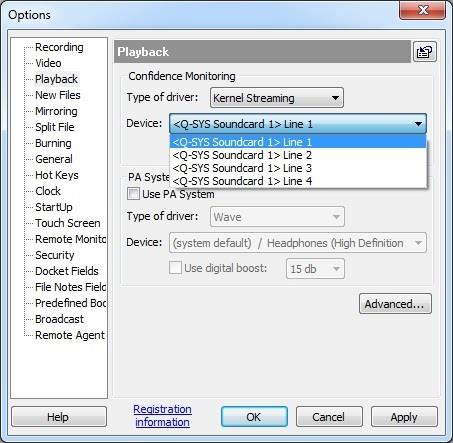
Use of 3rd Party Program "ASIO 4 All" Older versions of the Liberty Recorder sometimes required the use of a 3rd party program called "ASIO 4 All". The "ASIO 4 All" program is not required with current versions of the Liberty Recorder and its use is not recommended. We recommend that users upgrade to the latest version of the Liberty Recorder and that they uninstall the "ASIO 4 All" program. |
|
Copyright High Criteria Inc. 2005-2026. All Rights Reserved. |