|
Liberty Court Recorder |
|
|
Liberty Court Recorder |
The entire platform has been designed and vetted to support a wide range of operating models. Today, Liberty Court Recorder is deployed in over 10,000 courtrooms worldwide, from high-volume courts handling hundreds of cases per day to courts that conduct only occasional proceedings. Integrated, Not Fragmented Liberty Court Recorder is hardware-agnostic and designed to integrate with existing courtroom infrastructure, including microphones, DSPs, AV routing systems, and portable recording kits. The same recording application and workflow can be deployed on a single laptop for mobile or temporary use, or scaled into a fully integrated, multi-room courtroom environment - without changing how court staff interact with the system. This architectural approach also allows courts to expand functionality over time without changing how recordings are captured, managed, or preserved. These extensions include live streaming of proceedings, browser-based centralized monitoring and remote control, integrated virtual and hybrid courtroom functionality, and speech-to-text services delivered either in real time or through post-recording batch processing. Because these capabilities are implemented as extensions of the recorder rather than separate systems, audio, video, annotations, and transcription data remain synchronized within the same recording file. Courts can enable only the functionality they require while preserving a consistent process for capturing and managing the official record. Proven at Scale Liberty Court Recorder has been developed and refined since 2004 through direct collaboration with courts, court administrators, and IT teams. Its deployment footprint spans municipal, state, and federal courts across multiple jurisdictions and is structured to align with how courts actually operate - before, during, and after proceedings. Court staff can prepare for hearings in advance by importing docket information, configuring recording profiles, and selecting predefined templates. These tools reduce manual entry, improve consistency, and help ensure that recordings are properly labeled from the outset. While recording is active, court staff can create real-time, time-stamped annotations and docket-style bookmarks that are embedded directly into the recording file. Previously recorded portions of the hearing can be played back without interrupting the active recording, allowing judicial review or clarification while preserving a continuous record. At the same time, visual indicators and configurable alerts provide immediate feedback when audio levels fall below acceptable thresholds, enabling staff to address issues before the integrity of the record is compromised. After proceedings conclude, recordings are immediately available for authorized review, playback, export, or archival. Embedded metadata and bookmarks allow users to locate relevant portions of the record quickly, without manually scanning lengthy files. This same metadata can also be indexed within Windows, enabling advanced search and filtering capabilities for traditional file browsing. Liberty Recorder can record from one to thirty-two discrete channels, making it the ideal solution to address the needs of small hearings, depositions, courtrooms or larger meetings and assemblies. Liberty Recorder is available in hardware bundles that include the appropriate multi-channel sound card to address your recording requirements. Options also include a laptop configuration that allows the mobile user to create multi-channel recordings.
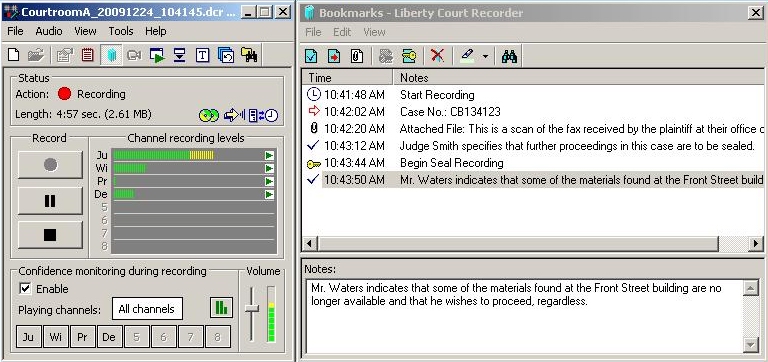
Cue Points and Associated Annotations This screen capture shows how the Liberty Court Recorder can be used to monitor the recording levels and add bookmarks into a recording. Text notes may be assigned to the recording file as "bookmarks". These bookmarkes establish cue points within the file that may be accessed instantly for playback purposes.
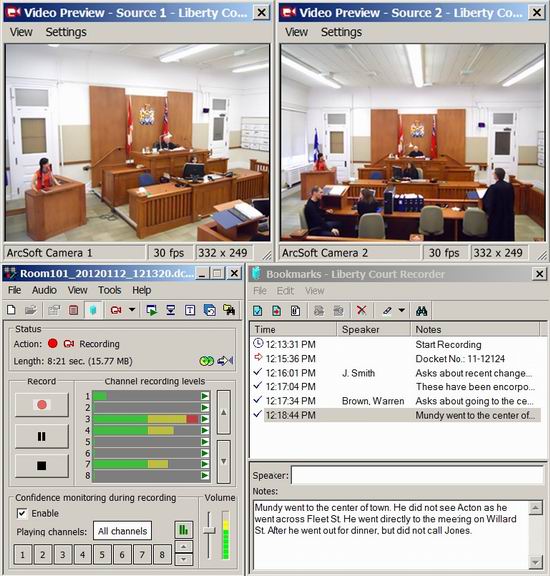
Records Multiple Independent Video Streams The Liberty Court Recorder may capture and record multiple video streams of the same courtroom. The screen capture below shows a recording with four independent video captures. 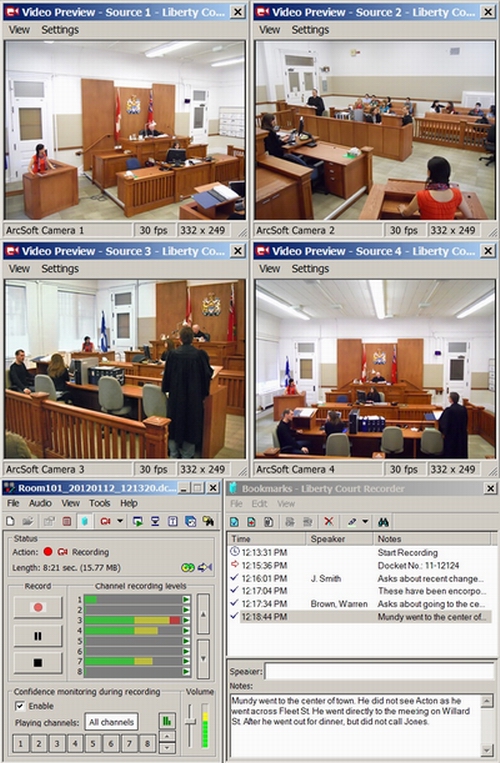
One, two or four independent video channels may be captured
Tutorial Video on the Liberty Court Recorder Watch the Quickstart Guide / Tutorial Video linked below about the Liberty Court Recorder.
The Liberty Player The Liberty Player provides playback facilities for your recording files. It is available as a no cost download by following the link below. The Player lets you select and listen to individual channels in a recording or a mix of several or all of the channels. The Player runs on any PC with Windows 7 or later that has standard audio capabilities. An optional foot pedal for controlling playback is available, please contact High Criteria for details. 
Download the Liberty Player Program for Windows The Liberty Player for Windows is a no-cost program that may be downloaded by following this link:
Liberty Player for Windows.
Liberty Court Player for Mac OS 10.6 and Later The Liberty Player for Mac OS 10.6 or later provides audio playback facilities for your dcr recording files on a Mac OS 10.6 or later computer. It is available as a no cost download from the link below. An optional foot pedal for controlling playback is available, please contact High Criteria for details. The Liberty Court Player for Mac is a no-cost program that may be downloaded by following this link: Liberty Court Player for Mac. Contact High Criteria for more Information
More details on the Liberty Recorder program can be obtained by
contacting High Criteria at |
|
Copyright High Criteria Inc. 2005-2026. All Rights Reserved. |