Liberty Notes Plus & Liberty Transcription Assistant
Liberty Notes Plus and Liberty Transcription Assistant provide a powerful, integrated workflow for capturing, annotating, and editing court proceedings, depositions, and other recorded events.
Liberty Notes Plus enables real-time speech-to-text (STT) transcription and live closed-captioning, allowing users to bookmark key moments during a session.
Liberty Transcription Assistant enhances transcript editing inside Microsoft Word, syncing STT results with Liberty Player for seamless proofing and review.
Together, these tools streamline the transcription process, reducing manual workload while ensuring accurate and time-stamped documentation.
Liberty Notes Plus
Capture, annotate, and refine proceedings in real time.
Liberty Notes Plus (LNP) works with the Liberty Recorder to generate live speech-to-text (STT) results. These rough transcripts can be:
✅ Displayed in real-time for closed captioning in courtrooms
✅ Saved as an RTF document for later editing
✅ Enhanced with bookmarks to highlight key moments
With Liberty Notes Plus, users can search transcripts instantly, synchronize notes with recordings, and jump directly to any point in the audio playback.
Liberty Notes Plus (LNP) works with the Liberty Recorder to generate live speech-to-text (STT) results. These rough transcripts can be:
✅ Displayed in real-time for closed captioning in courtrooms
✅ Saved as an RTF document for later editing
✅ Enhanced with bookmarks to highlight key moments
With Liberty Notes Plus, users can search transcripts instantly, synchronize notes with recordings, and jump directly to any point in the audio playback.
LNP: Key Features
- Real-Time STT Processing
Start/Stop live transcription at any moment - Time-Stamped Bookmarking
Add, edit, and delete notes with precise timing - Auto-Scroll & Real-Time Updates
Keep up with live transcription effortlessly - Seamless Integration with Liberty Player
Jump to audio sections instantly
- Closed Captioning Mode
Display live STT results on a large screen for accessibility
Powered by Microsoft Azure
Liberty Notes Plus utilizes third-party STT engines like Microsoft Azure for transcription processing. Users must create an Azure account to enable speech-to-text services.
Liberty Transcription Assistant
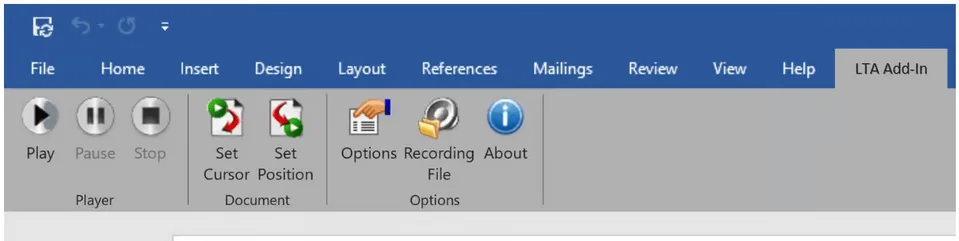
Liberty Transcription Assistant (LTA) is a Microsoft Word Add-in designed for transcript editing and proofing. It synchronizes STT results with Liberty Player, allowing users to effortlessly navigate between audio and text.
🔄 Jump between text and audio
⏯️ Control playback inside Word
📌 Highlight and refine STT results efficiently
🔄 Jump between text and audio
⏯️ Control playback inside Word
📌 Highlight and refine STT results efficiently
LTA: Key Features
- Word-Integrated Playback Controls
Play, pause, and stop audio from within Word - Set Cursor & Position Syncing
Jump to the corresponding point in the audio file - Highlight Tracking & Auto-Scrolling
Keep transcripts aligned during review
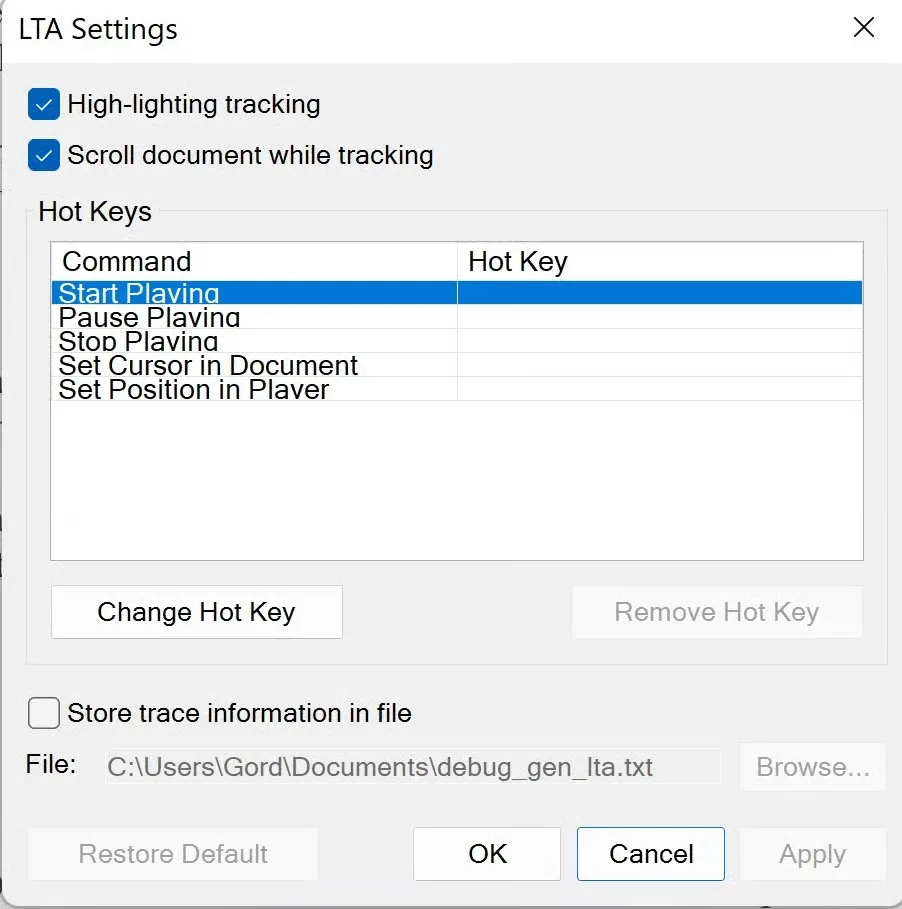
- Hotkey Support
Assign shortcuts for faster editing
Why Choose Liberty Notes Plus & Transcription Assistant?
Unlike other transcription tools, Liberty Notes Plus and Transcription Assistant offer:
✅ Full Integration with Liberty Recorder & Liberty Player
Synchronize audio, notes, and STT results effortlessly
✅ Real-Time Transcription for Live Captioning
Display courtroom captions instantly
✅ Efficient Editing in Word
Proofread and finalize transcripts with playback syncing
✅ Non-Proprietary File Formats
Save transcripts as RTF for compatibility with Word and other applications
✅ Full Integration with Liberty Recorder & Liberty Player
Synchronize audio, notes, and STT results effortlessly
✅ Real-Time Transcription for Live Captioning
Display courtroom captions instantly
✅ Efficient Editing in Word
Proofread and finalize transcripts with playback syncing
✅ Non-Proprietary File Formats
Save transcripts as RTF for compatibility with Word and other applications