Liberty Player
Liberty Player is an easy-to-use application for playing Liberty recording files, available for download at no cost. It supports all Liberty Recording applications, including Liberty Court Recorder and Liberty Interview Recorder, and allows users to select and listen to individual audio channels or a combination of multiple channels within a recording.
The Player is compatible with Windows (XP and later), macOS, iOS, and Android devices, requiring only standard audio capabilities. For added convenience, an optional foot pedal is available for hands-free playback control.
The Player is compatible with Windows (XP and later), macOS, iOS, and Android devices, requiring only standard audio capabilities. For added convenience, an optional foot pedal is available for hands-free playback control.
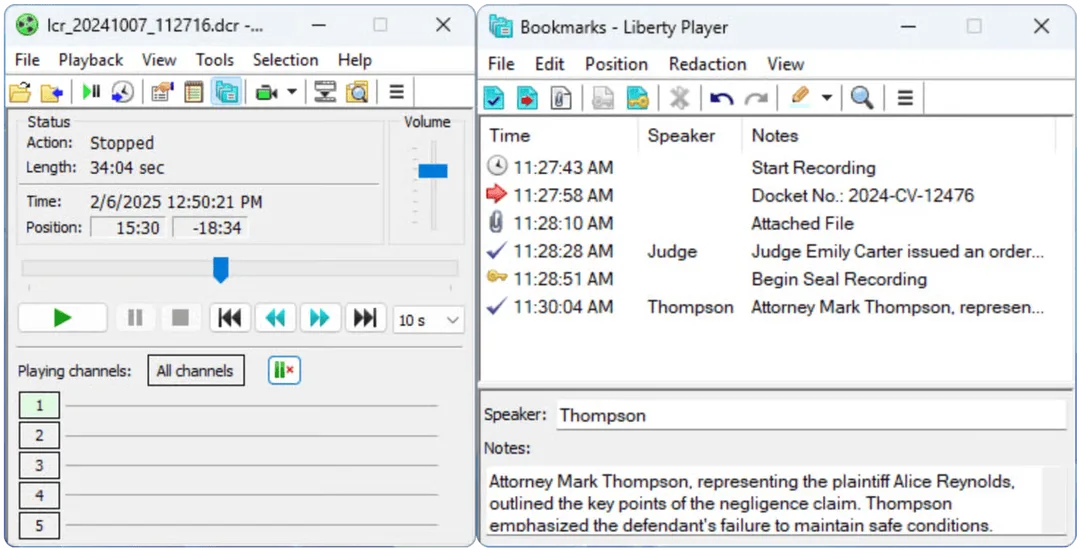
Key Features
✅ Universal Compatibility
Works across Windows, Mac, iOS, and Android
✅ Multi-Channel Playback
Play Liberty Recorder audio & video files
✅ Free & Easy to Use
Download and install at no cost
✅ Bookmark Support
Quickly navigate through recordings
Works across Windows, Mac, iOS, and Android
✅ Multi-Channel Playback
Play Liberty Recorder audio & video files
✅ Free & Easy to Use
Download and install at no cost
✅ Bookmark Support
Quickly navigate through recordings
Installation Notes
- If you have legacy player programs installed (Liberty Court Player or Liberty Interview Player), you must uninstall them first before installing Liberty Player.
- To retain settings, export your program settings (Tools → Export) before uninstalling, and import them (Tools → Import) after installing Liberty Player.
- Mac security settings may block installation from outside the App Store. To allow installation:
- Open System Preferences → Security & Privacy
- Under "General," click Open Anyway to proceed with installation.