• Published on

    Liberty Recording Suite v9.0: Purpose-Built Enhancements for the Modern Hybrid Courtroom

    Image description

    Liberty Recording is pleased to announce the official release of Liberty Recording Suite v9.0, the latest version of our integrated court recording, conferencing, and speech-to-text platform.


    Version 9.0 builds on Liberty’s long-standing focus: helping courts capture the official record clearly, reliably, and efficiently. This release introduces a wide range of enhancements across Liberty Court Recorder, Liberty Virtual Courtroom, and supporting server components, with a particular emphasis on reducing administrative overhead in hybrid and virtual courtroom environments.


    For courts managing remote appearances, virtual hearings, interpreters, private attorney-client discussions, and multi-channel recordings, v9.0 provides a more streamlined way to manage the entire proceeding from one connected platform.


    Integrated Recorded Conferencing for the Modern Courtroom

    Many courts still rely on separate systems for courtroom recording, video conferencing, remote participant management, and post-hearing review. While this approach can work, it often creates extra administrative burden: staff must manage multiple platforms, coordinate links, track participants manually, and ensure the final record accurately reflects what occurred.


    The Liberty Recording Suite takes a different approach.

    With Liberty Virtual Courtroom integrated directly into the Liberty recording workflow, remote participants can be managed as part of the proceeding itself. Audio, video, participant activity, and speech-to-text results can all be tied more closely to the official recording environment, helping reduce the number of disconnected steps court staff must manage.


    In v9.0, this integrated workflow has been strengthened with improvements to participant controls, private rooms, lobby management, video spotlighting, interpreter controls, connection handling, and recording-file metadata. These updates are designed to help courts conduct virtual and hybrid hearings with less friction and more confidence.


    Designed to Reduce Administrative Overhead

    The v9.0 release includes several enhancements focused directly on day-to-day court administration.


    Conference managers can now move participants between lobbies in real time, helping correct misrouted participants without requiring them to disconnect and rejoin through a different link. This is especially useful for courts managing multiple virtual courtrooms, high-volume dockets, or shared hearing environments.


    Version 9.0 also adds configurable Case/Docket/Ticket labels, allowing each court or deployment to use terminology that matches local workflows and jurisdictional standards. Liberty Court Recorder and Liberty Virtual Courtroom automatically retrieve and display this value, reducing the need for workarounds or generic field labels.


    For administrators and courtroom staff, small workflow improvements can have a large cumulative effect. Updated conference manager icons, clearer separation between conferencing users and gallery users, improved role color behavior, updated lobby login messages, and expanded customizable labels all contribute to a cleaner and more manageable experience.


    Parallel Private Rooms for More Flexible Hearing Management

    One of the major Liberty Virtual Courtroom enhancements in v9.0 is the addition of Parallel Private Rooms.


    Managers can now conduct private conversations with participants without interrupting the active conference. Calls can take place within a private room environment, and when the private session concludes, participants can be returned to the appropriate location. This helps support workflows such as attorney-client conversations, side discussions, pre-hearing coordination, or private conversations involving court staff.


    For courts, this can reduce the need for external communication tools, separate calls, or manual coordination outside the hearing platform.


    More Control Over Participant Abilities

    Virtual and hybrid hearings require structure. Courts need to determine who can speak, listen, chat, share screens, exchange files, or leave private rooms.


    Version 9.0 introduces expanded participant ability controls, allowing conference managers to enable or disable key participant functions during a session. These include self-join, chat, screen sharing, file sharing, and the ability to leave private rooms. Screen sharing and file sharing can also be managed on a per-participant basis.


    These controls give courts more flexibility to support different proceeding types while maintaining courtroom order and reducing the need for staff intervention.


    Spotlight Video Feeds for Witnesses, Evidence, and Presentations

    Liberty Virtual Courtroom v9.0 also adds the ability for a conference manager to spotlight a video feed for all users.


    When a participant’s video feed is enlarged for all attendees, that selected feed becomes the primary view, and participants cannot override the manager’s selection. This can be especially helpful during witness testimony, evidence presentation, screen sharing, or any moment where the court needs everyone focused on the same visual source.


    This feature helps keep proceedings organized and reduces confusion for remote participants.


    Interpreter Controls for Multi-Language Proceedings

    Courts increasingly need tools that support accessible, multi-language proceedings. In v9.0, managers can dynamically assign interpreter controls to desktop app users. Assigned interpreters gain specialized controls within their interface, helping structure interpreted proceedings without requiring external coordination tools.


    This helps courts support language access needs within the same integrated environment used to manage the hearing and recording.


    Improved Recording File Detail and Speech-to-Text Integration

    Version 9.0 also improves how information is captured and preserved in the recording workflow.


    Broadcast event logs, including mute and unmute events, can now be saved to the DCR recording file. Real-time speech-to-text results can also be included in the recording file as an attachment bookmark.


    For courts reviewing proceedings after the fact, these improvements help connect the recording with supporting context, making the record easier to understand, search, and manage.


    The release also improves speech-to-text channel naming by using the remote participant’s name in channel labels, creating clearer identification of speakers and remote participants within the recording environment.


    Better Stability and Visibility for Remote Participants

    Virtual hearing reliability remains critical. Version 9.0 includes improvements to connection stability and reporting, including automatic reconnection attempts for dropped users, improved performance for browser-based participants, and better visibility into connection quality.


    These enhancements are especially important for courts working with participants who may be connecting from different devices, networks, and locations.


    Built for Court Workflows, Not Generic Meetings

    Liberty Recording Suite v9.0 reflects the needs of courts that require more than a standard video meeting platform.


    Court proceedings involve dockets, roles, private discussions, interpreters, exhibits, remote participants, official records, and strict procedural expectations. A generic conferencing tool may handle the call, but it does not necessarily support the complete courtroom workflow.


    Liberty’s integrated approach helps reduce the administrative load by bringing recording, conferencing, participant management, speech-to-text, and record-related metadata into a unified environment.


    Availability

    Liberty Recording Suite v9.0 is now officially available.


    Courts and existing Liberty customers interested in learning more about the v9.0 release, upgrade planning, or integrated recorded conferencing workflows are encouraged to contact Liberty Recording for additional information.

  • Published on

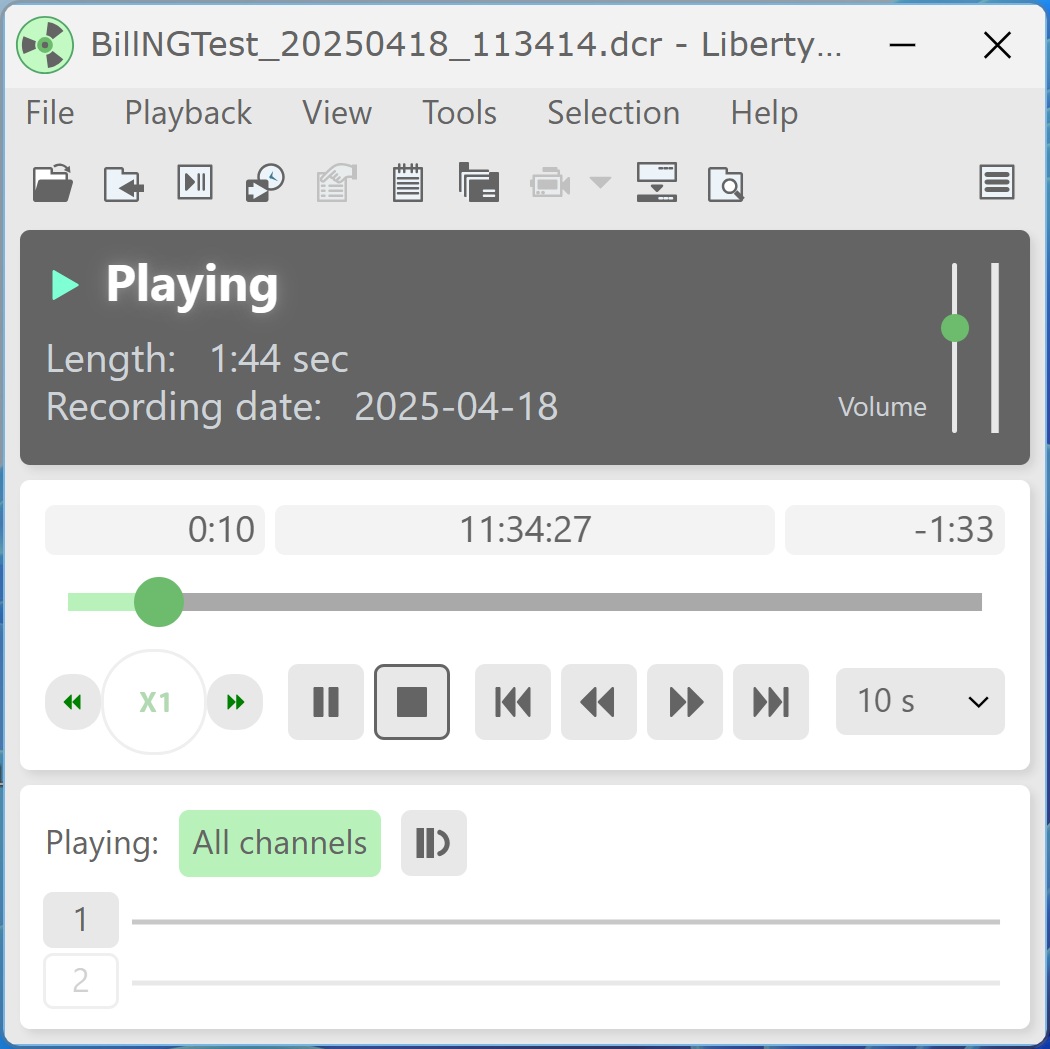
    NEW User Interface - Liberty Player 3.0

    October 10, 2025


    In addition to the newly released Android Liberty Player v2.6 (now available for download from the Google Play Store), the desktop Liberty Player v3.0 introduces a new, modern user interface designed to make playback controls easier to access and recording file information easier to view.


    To install, download the ZIP file from the Support page and run the appropriate installer:


    For 64-bit installations, run LibPlay30-x64.msi.

    For 32-bit installations, run LibPlay30.msi.


    The v3.0 beta includes all features and functionality from previous versions of Liberty Player. The primary change in this release is the updated user interface.


    Users who prefer the former “classic” interface can switch back at any time by opening View > Options, selecting the General tab, choosing Advanced, and enabling the "Use Classic interface" checkbox.

  • Published on

    Streamlining Virtual Hearings with the Liberty Virtual Courtroom: An In-Depth Analysis

    September 9, 2025

    Featuring: Glendale AZ City Court


    Introduction

    Courts across the country continue to face the challenge of balancing accessibility, efficiency, and reliability in their virtual hearings. General-purpose video conferencing platforms like Zoom, Teams, and Webex, while effective for everyday collaboration, struggle to meet the unique demands of a courtroom setting.


    This paper explores the recurring pain points courts face with these platforms, how Liberty Virtual Courtroom is purpose-built to address those needs, and the first-hand experience of Glendale City Court, which transitioned from Zoom to Liberty Virtual Courtroom and saw measurable improvements in time savings, staff efficiency, and participant confidence.


    Problem #1: Managing Multiple Virtual Courtrooms


    Why Zoom Hearings Take Longer

    The National Center for State Courts (NCSC) reports that remote hearings often take up to 34% longer than in-person hearings, with login conflicts and technical difficulties cited as leading causes of delay1. Courts relying on general-purpose platforms like Zoom or Teams struggle when running multiple dockets simultaneously, as login collisions and session timeouts disrupt proceedings and waste staff resources.


    How LVC is Built for High-Volume Courts

    Liberty Virtual Courtroom (LVC) allows multiple managers to co-manage different virtual courtrooms at the same time without logging out or ending sessions. Staff can seamlessly switch between lobbies and courtrooms, join a colleague's room instantly, and keep every docket moving in parallel. In short: the system was designed for the realities of high-volume courts where several hearings run concurrently every day.


    Time Saved in Glendale

    Devin McMillion, Court Operations Supervisor in Glendale, confirmed the difference after implementation: "I'd say the biggest thing we've saved is time. We're no longer battling for space on Zoom ... delays could range anywhere from 15 to 45 minutes depending on the number of in-custodies."


    He continued: "At times, we had up to four courtrooms running separate Zoom sessions simultaneously. Because of login limitations, one courtroom would often be kicked out ... The process added unnecessary stress, caused delays, and disrupted the overall flow of proceedings. With Liberty, those conflicts are gone."


    Problem #2: Process and Clerical Overhead


    The Hidden Burden on Clerks

    The NCSC has noted that one of the most common complaints about virtual hearings is the increased burden on clerks and staff. When using general-purpose platforms, recordings must often be downloaded, labeled, and manually stored, creating extra steps that introduce risk of error and consume valuable time. In many courts, this clerical overhead translates into hours of repetitive work each week.


    How LVC Eliminates Busywork

    Liberty Virtual Courtroom captures all in-room and remote audio/video and saves it directly into a single Liberty Court Recorder file - the same secure, evidentiary file used for in-person hearings. Every participant's isolated channel is preserved and merged into the case record automatically. By eliminating downloads, conversions, and duplicate files, LVC ensures consistency and saves staff from unnecessary post-hearing tasks.


    Glendale's Workflow Transformed

    Before adopting LVC, clerks in Glendale had to download and back up each Zoom recording to the courthouse's "R" drive - a manual process that added stress and slowed workflow.


    Devin McMillion explained: "Clerks were required to download and back up each Zoom recording ... creating yet another manual step that added to their workload." Since deploying LVC, that entire step has been eliminated. "Clerks no longer have to spend extra time downloading and backing up recordings, since everything is captured automatically within Liberty's recorder."


    The result is fewer errors, less repetitive work, and more time for clerks to focus on higher-value support for judges and case flow.


    Problem #3: In-Room Audio and Video Integration


    Why Remote Voices Go Unheard

    One of the recurring challenges in hybrid hearings is poor audio distribution in the courtroom. On general-purpose platforms, remote participants' voices often play only through a laptop or small bench speaker, making it difficult for everyone present to hear clearly. This not only frustrates participants but also undermines the sense of professionalism and formality that court proceedings demand. And in some setups can lead to chronic echo.


    How LVC Delivers Clear, Courtroom-Quality Audio

    Liberty Virtual Courtroom integrates directly with existing courtroom microphones, speakers, and Liberty Court Recorder. Remote participant audio is routed through the courtroom's main digital signal processor (DSP) - the same system used for in-room proceedings - ensuring that every voice is heard with clarity and without echo. This design elevates the formality of the hearing, maintains continuity with existing AV infrastructure, and reinforces courtroom professionalism.


    Better Sound, Smoother Hearings in Glendale

    Devin McMillion highlighted the unexpected impact this had on Glendale: "With Liberty Virtual Courtroom, participant audio plays through the courtroom's main speakers, rather than just external speakers at the judge's bench. This is a significant improvement, providing a more professional experience and making it easier for everyone in the courtroom to hear clearly." The shift not only improved audibility but also contributed to smoother proceedings and a more formal atmosphere in the courtroom - a detail that judges and staff quickly came to value.


    Problem #4: Public Access and Participant Confusion


    The Confusion Behind Virtual Access

    NCSC studies highlight that participant confusion is one of the leading causes of delay in virtual hearings. Multiple meeting links, passwords, and unclear access points often require clerks to spend valuable time walking participants through the connection process. Language access is another barrier: courts serving multilingual communities need to provide instructions and prompts in multiple languages, something most generic platforms don't support.


    How LVC Makes Access Simple

    Liberty Virtual Courtroom simplifies participant access with persistent lobby links tied to each courtroom. Links do not need to be regenerated when schedules change, reducing confusion and lost time. Additionally, LVC provides multilingual access, with all links, prompts, and voice instructions available in English, Spanish, and French. This ensures equitable access for participants and minimizes the need for staff intervention.


    Glendale's Participants Join With Ease

    According to Devin McMillion: "Since participants can either use a provided link or access the platform directly from our website, joining Liberty is much smoother and more straightforward. This reduces confusion and delays, minimizes the need for staff to provide technical support, and ensures that hearings start on time."


    Conclusions

    For Glendale, Liberty Virtual Courtroom turned persistent challenges into measurable improvements. Login conflicts no longer derail hearings, recordings save automatically without clerical overhead, participant audio reaches the full courtroom, and public access is simple and reliable.


    The result is more than convenience - it's a courtroom environment that feels professional, efficient, and prepared. Judges and staff focus on justice instead of technology, and participants experience smoother, more accessible proceedings.


    Glendale's experience underscores a clear truth: while general-purpose conferencing platforms may suffice for office meetings, courts require a purpose-built solution. Liberty Virtual Courtroom delivers that focus, enabling courts to reduce disruption, simplify workflows, and keep cases moving forward with confidence.


    For inquiries related to the Glendale City Court's implementation, contact Devin McMillion at: demcmillion@courts.az.gov


    1National Center for State Courts (NCSC). Remote Hearings and Access to Justice: Lessons Learned from the Pandemic, 2021.


    Contact Liberty Recording for more Information about the Liberty Virtual Courtroom and how it can enhance your courtroom's operational workflow.

  • Published on

    We Don’t Normally Do This... But Liberty Court Recorder v8.9 Deserves Its Own Spotlight


    At High Criteria, we don’t typically send out fanfare for every version update. But Liberty Court Recorder v8.9 isn’t just any update — it’s packed with features we know our court partners have been waiting for. From co-hosting and managing multiple courtrooms to supporting French-language access and NDI broadcasting, this release earns its own moment in the spotlight.

    Whether you're a tech-savvy clerk, an AV pro, or a courtroom coordinator juggling three hearings at once — there's something here for you.


    Multi-Conference Management

    This new feature (on our list of the ‘Top 10 Most Important Features’ of the last decade) allows court staff to co-manage, monitor and support multiple virtual courtrooms simultaneously.

    Additionally, an updated courtroom pane offers granular control over private rooms and active participants, including real-time visibility of all connected conference areas.


    Key Benefit:

    This gives support staff and administrators unmatched flexibility and efficiency, reducing overhead while improving responsiveness across concurrent hearings.


    French Support for Multilingual Access

    French has been added as a supported language for Liberty’s real-time Multilingual Access features across all apps and WebRTC sessions, joining existing support for Spanish. This update makes it easier for courts in bilingual jurisdictions to offer native translations of all prompts in the software and comply with language access mandates.

    Key Benefit:

    This ensures more inclusive proceedings and reinforces the platform’s commitment to expanding access to justice across North America and beyond.


    Advanced Time Management for Conferences

    Courtroom managers can now create permanent conference links tied to specific roles and times — perfect for recurring appearances. Roles and access times can also be adjusted dynamically from the conference management window during live hearings.


    Key Benefit:

    These flexible tools simplify scheduling, reduce confusion for participants, and give clerks and admins precise control over access and permissions.


    Liberty Virtual Courtroom on Google Play Store (June)

    While Android support has been available since 2021, the Liberty Virtual Courtroom app is officially coming to the Google Play Store this month, making it even more accessible for Android users. Previously available on iOS, the app provides a secure, one-tap connection to court proceedings from any device.


    Key Benefit:

    With full mobile access across platforms, participants and professionals can now join hearings from wherever they are — reliably and securely.


    NDI Broadcast Support

    In addition to existing NDI capture capabilities, Liberty Court Recorder now supports broadcasting as an NDI video stream, enabling real-time redistribution to other devices, screens, or systems.


    Key Benefit:

    This unlocks greater AV flexibility for hybrid courtrooms, especially those using centralized monitoring or streaming setups.


    Other Enhancements in v8.9

    • Gallery and Lobby lists can now be sorted alphanumerically by clicking on column headers.
    • Visual gestures (like raised hands) now appear next to participant names in the management pane.
    • Minor label updates improve consistency and legibility throughout the UI.
    • Updated WebRTC login instructions and interface (see below).

    New Login button for WebRTC Sessions


    A Quick Final Word

    We know “Version 8.9” doesn’t exactly sound like headline news — but for courts handling complex schedules, remote participants, and hybrid hearings, this release is a game-changer. We’re excited to get these features into your hands, and as always, we’re just an email away if you want a personalized walkthrough or need help getting started.


    In the meantime, stay tuned for some additional exciting releases just around the corner!

    For more information or to schedule a demo, contact High Criteria at sales@libertyrecording.com or visit www.libertyrecording.com.

  • Published on

    Built to Last: Why Open Standards Architecture Future-Proofs Recording Software

    As Windows 10 support ends, some recording systems may stop working. Discover why Liberty’s open standards architecture keeps government and judicial recording solutions future-proof, secure, and OS-independent.


    In October 2025, Microsoft will officially end support for Windows 10.


    For most users, that means upgrading to Windows 11 — a simple change on paper, but one that could have major implications in courtrooms, council chambers, and law enforcement facilities across the country.


    Why? Because not all recording software is built to adapt.


    Some legacy systems — especially those designed in the early 2000s — are deeply tied to specific Windows versions. As the OS evolves, these systems grow brittle. Recently, certain vendors have issued warnings to customers: critical functionality may fail after the Windows 10 end-of-life date. In some cases, customers are being told they must either upgrade to newer versions or migrate entirely to proprietary cloud platforms just to stay operational.


    That’s not innovation. That’s a warning sign.


    The Problem with Proprietary, Version-Locked Recording Systems


    At the heart of the issue is architecture — how a product is designed to interact with the systems around it.


    Many recording vendors developed their platforms around Windows 7 or Windows 10 without future-proofing in mind. This makes their software vulnerable to breakage with every major Windows update. And when the OS changes, the burden shifts to IT teams — often with no warning and limited options.


    For government agencies, the consequences are significant:

    • Unanticipated upgrade costs just to stay compliant
    • Operational downtime during critical sessions
    • Security vulnerabilities when legacy systems can't be patched


    These aren’t minor technical issues — they’re infrastructure liabilities. Especially in justice environments, where systems are expected to last 10+ years.


    To make matters worse, many proprietary vendors enforce rigid upgrade paths by locking key features — or even basic functionality — to specific OS builds. This puts users in a dependency trap, where staying functional often requires:

    • Migrating to an entirely new (often cloud-based) platform
    • Replacing otherwise functional recording infrastructure
    • Paying for “support extensions” to remain compatible


    And now, as Windows 10 sunsets, some vendors are warning that their software will stop working altogether — unless customers:

    • Purchase new licenses
    • Navigate complex migration steps
    • Risk losing access to older recordings
    • Accept reduced control over platform behavior


    This isn't just about cost. It's about control. And it's a direct result of closed, OS-bound system design.


    Why Government and Judicial IT Teams Prefer Platform Stability


    In legal environments, stability isn’t optional — it’s essential.


    Courtrooms don’t get rescheduled because of software bugs. Police departments can’t miss an interview due to a surprise OS issue. City council meetings don’t pause for IT maintenance. The systems supporting these operations must be reliable, flexible, and low-maintenance over the long term.


    Liberty Recording is built to meet those needs — with consistency, not forced obsolescence.

    With Liberty:

    • IT teams stay in control of when and how to update
    • Critical AV systems remain operational, even through OS transitions
    • Recordings remain accessible, years after capture — regardless of platform changes


    Because Liberty doesn’t rely on internet connectivity or proprietary cloud services, it also runs seamlessly in air-gappedsecure, or offline environments — common in courtrooms and law enforcement settings.


    How Liberty Uses Open Standards Architecture to Avoid OS Issues


    Liberty Recording has followed one core principle since day one: build around open standards, not operating system limitations.

    Liberty Court Recorder File Mirroring Tab 2005-2025

    Our recording software is engineered to minimize OS dependencies and deliver long-term operability, whether installed in 2005 or 2025.


    Key benefits of Liberty’s open standards architecture:

    • Audio and video are captured using standard Windows APIs
    • Systems can record to local drives, secure networks, or offline devices
    • No cloud account or subscription is required to record, play, or export
    • Updates are optional — not mandated by the latest OS version


    Even Liberty Recorders installed a decade ago on Windows 7 continue to function reliably today. While modern resolutions may change how things look, the core functionality is fully preserved.


    That’s the benefit of architecture built to last — not just to sell upgrades.


    Solution: Invest in Courtroom Recording Solutions That Age Gracefully

    Choosing the right recording software isn’t just about today’s features — it’s about protecting tomorrow’s continuity.


    Liberty Recording is committed to building future-proof courtroom systems based on open standards, long-term support, and platform flexibility. Our software works with the tools you have now, and the tools you’ll adopt later — without locking you into costly migrations or version-based support cycles.


    Don’t let an operating system dictate the future of your AV infrastructure.


    Choose a recording platform that’s as reliable as your institution’s mission.


    Contact Liberty Recording at: sales@LibertyRecording.com to learn more about why we’re trusted by courts, councils, and law enforcement agencies world-wide.

  • Published on

    Protecting the Official Record in the Age of AI Manipulation

    The threat isn’t if recordings are manipulated—it’s proving they weren’t. Digital signatures give courts and law enforcement agencies a secure, verifiable chain of custody.


    As artificial intelligence (AI) tools like deepfakes and voice cloning become increasingly realistic and accessible, courts and law enforcement agencies alike face new challenges in maintaining the integrity of digital evidence.


    The question is no longer if recordings might be manipulated—it’s how courts and agencies can prove that they haven’t been.


    While no one can fully control what happens to a file once it enters the public domain, both judicial bodies and law enforcement departments can take strong measures to protect the authenticity of recordings. The most effective way to do this is through digital signatures, which provide cryptographic proof that a recording has not been altered since its creation.


    The Real-World Threat: Quiet Tampering, Not Public Disinformation

    While much of the public discourse around AI manipulation focuses on viral deepfakes or misinformation, the greater risk to the justice system lies in subtle, behind-the-scenes tampering. The most dangerous actors aren’t posting content online—they’re quietly attempting to:

    • Undermine public trust in a ruling or verdict
    • Remove, alter, or obscure audio video evidence
    • Introduce falsified media in post-trial motions
    • Modify notes or metadata to mislead record interpretation


    Protecting the record starts with controlling access. Recording systems—whether they’re capturing a courtroom hearing or a custodial interview—must enforce role-based access controls to ensure that only authorized personnel can initiate, manage, or retrieve recordings. This foundational layer of security significantly reduces the opportunity for tampering by limiting who can interact with sensitive files.


    And even though Liberty also supports RBAC through tools like Liberty Web Access, access control alone isn’t enough.


    Even in tightly secured environments, courts and agencies must be able to demonstrate that a file is authentic and unmodified—and that’s where digital signatures play a critical role.


    What Is a Digital Signature—and Why Does It Matter?

    digital signature acts like a tamper-evident seal for a digital file. Think of it as the modern equivalent of sealing an envelope with wax: it confirms the contents are untouched and flags if anything has been changed.


    When a recording is finalized in Liberty Court Recorder or Liberty Interview Recorder, the software can automatically apply a unique cryptographic signature that captures two key elements:

    1. The exact date and time the file was completed
    2. mathematical fingerprint of the file’s contents


    If the file is edited—even subtly—this fingerprint no longer matches, and the signature verification fails.


    Unlike basic file properties (like "last modified" timestamps), digital signatures are cryptographically verifiable, resistant to spoofing, and legally admissible as proof of integrity.


    This creates a tamper-evident chain of custody—ensuring that official recordings remain authentic, complete, and defensible in any proceeding or investigation.


    How to Enable Digital Signing in Liberty Court Recorder or Interview Recorder

    If your court or agency is running the latest version of Liberty Court Recorder or Interview Recorder, enabling digital signatures is simple:

    1. Go to File > Options > Digital Signature
    2. Choose your signing method:
    • Use a local certificate (provided by your IT department), or
    • Select a trusted Time Stamp Authority (TSA) such as DigiCert or GlobalSign
    1. (Recommended) Check the option for “Add signature after recording has stopped.”
    • This ensures each session is automatically signed when it ends—avoiding manual steps.

    Liberty Court Recorder > File > Options > Digital Signature


    To sign a completed recording manually, go to File > Sign in the recorder. This applies the digital signature to the file, locking it with a trusted cryptographic seal.


    Verifying a Recording for Tampering

    If a recording’s authenticity is ever questioned—whether during a trial, a review board hearing, or a criminal investigation—staff can use Liberty Court RecorderInterview Recorder, or the Liberty Player to verify the digital signature:

    • Open the file
    • Select File > Verify Signature


    If the file has been altered since it was signed, the system will clearly indicate that the signature is invalid. If the file is intact, the software will confirm that the signature is trusted and the data has not been modified.


    While the system won’t pinpoint the exact change, it will identify the type of modification (e.g., media, bookmarks, notes, metadata)—providing helpful insight during the review process.


    Recommended Best Practices for Courts and Law Enforcement

    To strengthen your approach to recording integrity:

    • 🔒 Enforce role-based access controls within the recording system
    • 🖋️ Digitally sign recordings at the end of each session using secure certificates
    • 📘 Train judicial and investigative staff on how digital verification works
    • 📁 Retain only signed originals in secure, centralized storage
    • 🚫 Avoid circulating unsigned copies, especially in high-profile or sensitive cases

    These practices don’t just protect your evidence—they help build trust with the public, the press, and the legal system as a whole.


    Final Thought: A Trusted Record in a Changing World

    In a digital environment where AI-generated content is reshaping perceptions of truth, the integrity of the official record is non-negotiable.


    By combining secure access controls with cryptographically verifiable digital signatures, courts and law enforcement agencies can ensure their recordings are tamper-evident, trustworthy, and future-proof—no matter what challenges lie ahead.


    If your organization is ready to implement digital signing—or if you'd like help reviewing your current recording security practices—


    Contact Liberty Recording at: support@LibertyRecording.com