• Published on

    Liberty Recording Security Advisory: PHP2Shell Vulnerabilities

    Published: October 23, 2026


    Liberty Recording is aware of the recently disclosed critical vulnerabilities affecting PHP, identified as CVE-2026-109618 and CVE-2026-109619, collectively referred to as PHP2Shell.


    These vulnerabilities may allow unauthorized remote code execution on affected systems. In response to their disclosure, we have reviewed our software products and services to assess potential exposure.


    Our Assessment

    Based on our assessment, Liberty Recording's software products are not affected by these vulnerabilities.


    Our applications and supporting services do not rely on PHP and are therefore not directly susceptible to the identified vulnerabilities.


    This assessment includes our core recording, conferencing, transcription, publishing, and supporting software solutions.


    Third-Party Services

    As part of our review, we have also considered third-party services used in our business operations.


    Our public website is hosted through Articulation, a third-party managed website platform. We are seeking confirmation from the provider regarding any potential exposure and applicable security updates.


    This review is limited to our public website infrastructure and does not affect the operation or security of Liberty Recording's software products.


    Customer Impact

    Based on our current assessment:

    • No Liberty Recording software products are directly affected by the identified PHP vulnerabilities.
    • No customer action or Liberty Recording software updates are required in response to these vulnerabilities.
    • We are continuing to review the status of relevant third-party services.


    Our Commitment to Security

    Protecting the security and integrity of our customers' systems remains a priority at Liberty Recording.


    We continue to evaluate emerging security vulnerabilities, review potential impacts on our products and services, and work with our technology partners as necessary.


    Should our assessment change or additional action become necessary, we will communicate relevant information to affected customers.


    For questions regarding this advisory, please contact Liberty Recording through our established support channels.


    Additional Information

    For more information about the PHP2Shell vulnerabilities, including their technical impact and recommended security measures, please refer to the following resources:


  • Published on

    The Underinvestment Crisis in the Courtroom

    Image description

    Courts face two interconnected pressures that are likely to shape courtroom operations over the next decade: a shrinking pool of qualified staff and growing demands on the employees who remain.

    As staffing shortfalls increase individual workloads, sustained workload pressure can contribute to further attrition—placing even greater strain on an already limited workforce.


    Courts are increasingly aware of this cycle and have begun taking steps to address it. However, many lack the institutional resources necessary to implement the broader structural changes required to break it. Immediate operational demands understandably take priority, leaving limited time, staffing, and budget available to evaluate longer-term strategies and investments. 


    At Liberty Recording, we refer to this broader structural challenge as the Underinvestment Crisis. It is not simply a question of funding. Rather, it reflects the difficulty courts face in allocating sufficient resources toward the people, processes, and technologies needed to support increasingly complex operations.


    Staffing Shortfalls

    Compensation provides one of the clearest indicators of this underinvestment.


    Over the past decade, wages for court clerks and judicial law clerks have declined substantially relative to median individual income. According to Bureau of Labor Statistics data analyzed for this article, court clerks and related positions have declined from approximately 125% of median individual income to roughly 105% (see Figure A). Among judicial law clerks, the decline is even more pronounced, from approximately twice the median individual income to around 150% (see Figure B). 

    Image description

    Figure A:
    Court (and related) Clerk Wage Growth

    Image description

    Figure B:
    Judicial Law Clerk Wage Growth

    For judicial law clerks in particular, compensation must also be considered alongside the educational requirements of the position. Law graduates entering the workforce may face substantial student debt while also having access to private-sector opportunities offering considerably higher compensation. Courts therefore compete for qualified candidates within a labor market in which the financial advantages of alternative career paths can be significant.


    More Work, Fewer People

    Compensation is only one side of the problem. The work required to administer increasingly complex cases and facilitate modern court proceedings has also expanded.


    Digital discovery is one contributing factor. As records, communications, and evidentiary materials have moved into digital formats, the volume of information associated with individual cases can increase substantially. Court staff may consequently be responsible for receiving, organizing, preserving, and managing far more material than would have been practical in a predominantly paper-based environment.

    Data center interior hallway

    Virtual and hybrid hearings have added another layer of operational complexity. Meeting-based platforms adopted rapidly during the COVID-19 pandemic enabled courts to maintain continuity of operations and remain in use in many jurisdictions. However, these systems were developed primarily for general-purpose conferencing rather than the specific operational requirements of judicial proceedings.


    Courtroom workflows may require simultaneous management of multiple proceedings, controlled movement of participants, differentiated access to video or evidence, private communications, recording, and coordination with in-room AV systems. When the underlying platform was not designed around those requirements, courts may be required to create additional procedures or rely on staff intervention to bridge the gap.


    The result is an important distinction: the answer is not simply more technology, but technology that reduces rather than adds to administrative workload.


    Investment Should Reduce Work

    Courts organize their personnel differently. In some jurisdictions, clerks may also operate recording and conferencing systems. In others, those responsibilities fall to dedicated court reporters, recording operators, technical staff, or combinations of these roles. Technology therefore cannot assume a single staffing model. It must be sufficiently flexible to support the operational structure of the individual court.


    At Liberty Recording, we have addressed many of these challenges through Liberty Virtual Courtroom and the broader Liberty ecosystem. However, conferencing technology represents only one component of the larger response required.


    The Underinvestment Crisis is fundamentally institutional. Courts, administrative offices, technology providers, and policymakers all have roles to play in developing sustainable solutions. Greater coordination among these groups can help reduce duplicated effort and lessen the need for individual courts to independently solve recurring operational problems. 

    Legal professionals collaborating

    The same is true across jurisdictions. Courts regularly encounter similar challenges involving software limitations, AV integration, participant management, recording workflows, and staffing. Greater exchange of implementation experience allows successful practices developed in one court to inform decisions elsewhere while helping other jurisdictions avoid known limitations and unsuccessful approaches. 


    Technology alone cannot resolve the Underinvestment Crisis. Staffing, compensation, workload, policy, and institutional resources remain closely interconnected. However, technology that reduces administrative burden, improves operational consistency, and makes more effective use of existing staff can form an important part of a broader response.


    Facing These Challenges in Your Court?

    Every court experiences the Underinvestment Crisis differently. Staffing models, workloads, budgets, and technology environments vary considerably from one jurisdiction to another.


    If your court is facing similar pressures, Liberty Recording can help identify opportunities to reduce administrative burden, simplify courtroom workflows, and make better use of the staff and resources already available to you.


    Let’s talk about how we can help!

  • Published on

    Our Three Biggest Takeaways from CLCT 2026

    Image description


    We recently had the opportunity to attend CLCT, and the experience left us encouraged by the thoughtful discussions surrounding artificial intelligence and its role in the judiciary.


    For those unfamiliar, the Center for Legal & Court Technology (CLCT) is a joint initiative of William & Mary Law School and the National Center for State Courts, dedicated to improving the administration of justice through technology. This year's conference brought together judges, court administrators, technologists, and industry professionals to discuss the opportunities and challenges surrounding AI in the judiciary. While the conversations covered a wide range of topics, three key takeaways stood out to us.


    1. Transcripts, Not Judgments

    The consensus was refreshingly clear: AI has a valuable role in the courtroom, whether that's producing first-draft transcripts, improving judicial writing, or assisting with administrative tasks.


    However, there was equally strong agreement that AI should not be responsible for interpreting evidence or making judicial decisions.


    AI should assist judges, not replace their judgment.


    2. Local, Not Cloud

    One of the most prominent themes was the importance of data sovereignty and intelligence independence.


    Several jurisdictions shared examples of locally deployed AI tools, ranging from formatting case data for integration with case management systems to searching complex legal knowledge bases.


    Interestingly, cost savings weren't the primary motivation. Instead, judges expressed concerns about how sensitive court data might be used by cloud-based AI providers, particularly when it comes to training future models.


    For courts, maintaining control over their data isn't simply a preference. It's a fundamental responsibility.


    3. Enhancement, Not Replacement

    Perhaps our favorite takeaway was the recognition that AI doesn't necessarily need to save time to provide value.


    Judge Scott Schlegel of Louisiana's Fifth Circuit Court of Appeal noted that AI tools can improve the quality of judicial writing by identifying errors and producing more accurate legal research results, even when they don't meaningfully reduce the time required.


    The goal isn't to replace court staff or automate every process. It's to give the people responsible for administering justice better tools to do their jobs.


    Looking Ahead

    Woven throughout these discussions was a larger concern about judicial autonomy and ensuring that technology never supersedes human authority.


    What impressed us most was that these conversations weren't driven by either the promise or the fear of AI. They were driven by careful consideration of its practical applications, limitations, and responsibilities.


    While the adoption of AI in courts won't be without challenges, we're encouraged by the thoughtful approach many jurisdictions are already taking.


    At Liberty Recording, we look forward to supporting courts as they navigate this transition, with an emphasis on preserving the independence, integrity, and control that our judicial institutions require.

  • Published on

    Spooky Season Is Here. Don’t Let AI Transcription Claims Haunt Your Court.

    Judge, court clerk, and IT administrator approach a haunted courthouse labeled ‘AI Transcription Claims,’ beneath the headline ‘Don’t Let AI Transcription Claims Haunt Your Court.’


    October has arrived. The decorations are going up, the days are getting shorter, and spooky season is officially underway.


    But for courts evaluating speech-to-text technology, ghosts and goblins may not be the scariest thing lurking around the corner.


    It might be the promise of “AI-powered,” “proprietary,” or “next-generation” transcription technology that sounds extraordinary in a demonstration—but tells you remarkably little about how it will perform in an actual courtroom.


    A new September 2026 resource bulletin from the Joint Technology Committee (JTC), AI-Assisted Transcription in Courts: Governance, Use, and Safeguards, offers courts a timely reality check.


    And much of its guidance reinforces something we at Liberty have believed from the beginning:


    Speech-to-text should be treated as a powerful tool—not a magic trick (or treat).


    Start With the Problem, Not the AI


    One of the simplest recommendations in the JTC bulletin may also be the most important:


    “Before undertaking an AI-assisted transcription project, courts should identify the specific problem they are trying to solve.”  


    That sounds obvious.


    Yet the current AI market often encourages organizations to work backward: find an impressive technology first, then determine where it might fit.


    Courts deserve better.


    Are you trying to make recorded proceedings searchable? Give judges faster access to testimony? Provide draft transcripts? Improve accessibility? Reduce transcription turnaround time? Support staff working through a reporting shortage?


    Those are different problems, with different risks and different requirements.


    The JTC notes that courts are generally using AI transcription to support digital recording, create draft text, improve searchability, and enhance accessibility—not simply replace certified court reporting.


    That distinction matters.

    Close up image of gooseneck microphone shown in focus with courtroom out of focus in background.

    The Recording Still Comes First


    Perhaps the bulletin's most significant point is also one of the least glamorous:

    Good transcription starts with good audio.


    The JTC states plainly that AI-assisted transcription “depends first on a reliable digital recording system for court proceedings.” It goes on to emphasize that clear source audio is foundational to transcript accuracy and that multi-channel recording can help distinguish speakers and support review.


    That should change the way courts evaluate STT vendors.


    A transcription engine cannot recover information that was never captured clearly in the first place.


    Poor microphone pickup, overlapping speakers, courtroom acoustics, HVAC noise, paper movement, side conversations, and inconsistent audio levels can all affect the output. The bulletin specifically warns that real-world courtroom conditions can materially degrade transcription performance.


    In other words:


    The most impressive AI demo in the world cannot compensate for a bad record.


    That is why Liberty has always viewed speech-to-text as part of a broader recording ecosystem—not as a replacement for one.

    About That “Proprietary AI”…


    Here is where a little healthy skepticism is warranted.


    Speech recognition technology has advanced extraordinarily quickly. High-quality engines are increasingly available from major cloud providers, specialized vendors, open-source projects, and other technology platforms.


    That is good news for courts.


    It also means the phrase “proprietary AI” should begin, not end, the procurement conversation.


    • What exactly is proprietary?
    • Is the vendor developing the underlying speech-recognition model?
    • Are they licensing or integrating another provider's engine?
    • Can the transcription engine change over time?
    • Where is the audio processed?
    • Is court data retained?
    • Can it be used for model training?
    • What happens if the underlying provider changes?
    • And, most importantly:
    • How does it actually perform on your recordings?


    The JTC recommends precisely that kind of scrutiny.


    Courts should test transcription systems using representative local courtroom recordings rather than relying on “vendor claims or generic performance metrics.”


    That's a sentence worth remembering.


    A carefully prepared demonstration recording is one thing.


    A Tuesday morning docket with six speakers, an interpreter, overlapping testimony, rustling papers, somebody sitting too far from the microphone, and an HVAC system that has apparently decided to join the proceeding is another.


    Test the latter.

    Multiple arrows shown in the center circle of a target.

    Accuracy Is Not One Number


    Another trap is the temptation to reduce transcription performance to a single impressive percentage.


    “95% accurate.”

    “98% accurate.”

    “Industry-leading accuracy.”


    Those numbers may sound reassuring, but courts should ask what they actually represent.

    The JTC recommends evaluating not just word-level accuracy but material-error rates, correction burden, turnaround time, speaker identification, and failure points in challenging proceedings.


    That is much closer to the question courts really need answered.


    An incorrect article or conjunction may be annoying.


    An incorrect name, dollar amount, date, legal term, speaker attribution, or critical word in testimony can be something very different.


    And the bulletin explicitly identifies many of the environments where automated transcription can struggle: overlapping speech, accents and dialects, multilingual proceedings, interpreters, legal terminology, names, dates, numbers, rapid speech, and speaker attribution.


    So rather than asking:

    “What is your accuracy rate?”


    Try asking:

    “Show us where your system fails.”


    That may be one of the most valuable questions in an STT evaluation.

    The Real Value May Be Everything Around the Transcript


    In practice, one of the most common ways Liberty customers use speech-to-text today is much simpler: search.


    Rather than treating machine-generated text as the official record, courts use it as an index into the recording—searching for a name, phrase, or topic, then jumping back to the corresponding audio to verify what was actually said.


    That workflow closely reflects the approach described in the JTC bulletin, which notes that AI-generated text can be used as a shortcut for locating information in the underlying recording and recommends verifying relevant content against the source audio.


    And importantly, Liberty does not resell or mark up the speech-to-text service itself.


    Today, a court with an Azure account, Liberty Post Recording Manager, and existing recordings can begin batch-processing those files through Azure Speech Services directly. Liberty provides the workflow and integration; the court maintains its own relationship with the transcription provider.


    [Learn how to configure speech-to-text in Liberty Post Recording Manager →]


    At current Azure pricing (October 2026), that can be approximately $0.18 per processed hour of audio, depending on the service and configuration.


    For many courts, that means the value proposition is not “buy our AI.” It is simply: make the recordings you already have dramatically easier to find and use.


    This is also why we believe speech-to-text itself will increasingly become a commodity.


    The differentiator isn't simply whether software can turn audio into words, the more important questions are what happens next.


    • Can a user click into the transcript and hear the corresponding audio?
    • Can the system identify speakers based on isolated recording channels?
    • Can judges and staff search an entire proceeding?
    • Can access be controlled?
    • Can confidential proceedings be protected?
    • Can retention requirements be honored?
    • Can the system integrate into existing court workflows?
    • Can the court export its own data?
    • Can a better transcription engine be adopted later without replacing the entire recording infrastructure?


    Interestingly, the JTC procurement recommendations focus heavily on exactly these surrounding capabilities: synchronized transcript and recording playback, speaker/channel identification, search, audit logs, confidentiality controls, data ownership, retention, security, and protections against vendor lock-in.


    That is where we believe courts should concentrate their attention.

    Liberty speech-to-text results opened in Microsoft Word as a searchable RTF file for local court review.

    AI Transcription Shouldn't Be Scary


    None of this means courts should avoid speech-to-text.


    Quite the opposite.


    AI-assisted transcription has enormous potential to make recorded proceedings easier to search, faster to review, more accessible, and more useful. The JTC describes growing—but appropriately cautious—experimentation across courts and related adjudicative organizations.


    At Liberty, we're excited about that future!


    We just think courts should be allowed to see the technology for what it is.


    Speech-to-text is a tool.

    A rapidly improving one.

    And increasingly, a widely available one.


    That belief also shaped Liberty’s approach to the results themselves. Most courts already have Microsoft Word, so they shouldn’t need a proprietary or cloud-based text editor just to review or search speech-to-text output. As shown in the screenshot above, Liberty can generate standard RTF files that open directly in Word, helping keep the workflow familiar, local, searchable, and simple.


    So, this spooky season, don't be frightened by AI. Be wary of the smoke machine.


    Ask what is actually powering the system—and what value the vendor is adding around it.

    • Test it against your own proceedings.
    • Understand where your data goes.
    • Measure the errors that matter.
    • Require human review where the stakes demand it.


    And when someone tells you their transcription technology is unlike anything else on the market?


    Maybe ask them to turn the lights on.

  • Published on

    Liberty Recording Suite v9.0: Purpose-Built Enhancements for the Modern Hybrid Courtroom

    Image description

    Liberty Recording is pleased to announce the official release of Liberty Recording Suite v9.0, the latest version of our integrated court recording, conferencing, and speech-to-text platform.


    Version 9.0 builds on Liberty’s long-standing focus: helping courts capture the official record clearly, reliably, and efficiently. This release introduces a wide range of enhancements across Liberty Court Recorder, Liberty Virtual Courtroom, and supporting server components, with a particular emphasis on reducing administrative overhead in hybrid and virtual courtroom environments.


    For courts managing remote appearances, virtual hearings, interpreters, private attorney-client discussions, and multi-channel recordings, v9.0 provides a more streamlined way to manage the entire proceeding from one connected platform.


    Integrated Recorded Conferencing for the Modern Courtroom

    Many courts still rely on separate systems for courtroom recording, video conferencing, remote participant management, and post-hearing review. While this approach can work, it often creates extra administrative burden: staff must manage multiple platforms, coordinate links, track participants manually, and ensure the final record accurately reflects what occurred.


    The Liberty Recording Suite takes a different approach.

    With Liberty Virtual Courtroom integrated directly into the Liberty recording workflow, remote participants can be managed as part of the proceeding itself. Audio, video, participant activity, and speech-to-text results can all be tied more closely to the official recording environment, helping reduce the number of disconnected steps court staff must manage.


    In v9.0, this integrated workflow has been strengthened with improvements to participant controls, private rooms, lobby management, video spotlighting, interpreter controls, connection handling, and recording-file metadata. These updates are designed to help courts conduct virtual and hybrid hearings with less friction and more confidence.


    Designed to Reduce Administrative Overhead

    The v9.0 release includes several enhancements focused directly on day-to-day court administration.


    Conference managers can now move participants between lobbies in real time, helping correct misrouted participants without requiring them to disconnect and rejoin through a different link. This is especially useful for courts managing multiple virtual courtrooms, high-volume dockets, or shared hearing environments.


    Version 9.0 also adds configurable Case/Docket/Ticket labels, allowing each court or deployment to use terminology that matches local workflows and jurisdictional standards. Liberty Court Recorder and Liberty Virtual Courtroom automatically retrieve and display this value, reducing the need for workarounds or generic field labels.


    For administrators and courtroom staff, small workflow improvements can have a large cumulative effect. Updated conference manager icons, clearer separation between conferencing users and gallery users, improved role color behavior, updated lobby login messages, and expanded customizable labels all contribute to a cleaner and more manageable experience.


    Parallel Private Rooms for More Flexible Hearing Management

    One of the major Liberty Virtual Courtroom enhancements in v9.0 is the addition of Parallel Private Rooms.


    Managers can now conduct private conversations with participants without interrupting the active conference. Calls can take place within a private room environment, and when the private session concludes, participants can be returned to the appropriate location. This helps support workflows such as attorney-client conversations, side discussions, pre-hearing coordination, or private conversations involving court staff.


    For courts, this can reduce the need for external communication tools, separate calls, or manual coordination outside the hearing platform.


    More Control Over Participant Abilities

    Virtual and hybrid hearings require structure. Courts need to determine who can speak, listen, chat, share screens, exchange files, or leave private rooms.


    Version 9.0 introduces expanded participant ability controls, allowing conference managers to enable or disable key participant functions during a session. These include self-join, chat, screen sharing, file sharing, and the ability to leave private rooms. Screen sharing and file sharing can also be managed on a per-participant basis.


    These controls give courts more flexibility to support different proceeding types while maintaining courtroom order and reducing the need for staff intervention.


    Spotlight Video Feeds for Witnesses, Evidence, and Presentations

    Liberty Virtual Courtroom v9.0 also adds the ability for a conference manager to spotlight a video feed for all users.


    When a participant’s video feed is enlarged for all attendees, that selected feed becomes the primary view, and participants cannot override the manager’s selection. This can be especially helpful during witness testimony, evidence presentation, screen sharing, or any moment where the court needs everyone focused on the same visual source.


    This feature helps keep proceedings organized and reduces confusion for remote participants.


    Interpreter Controls for Multi-Language Proceedings

    Courts increasingly need tools that support accessible, multi-language proceedings. In v9.0, managers can dynamically assign interpreter controls to desktop app users. Assigned interpreters gain specialized controls within their interface, helping structure interpreted proceedings without requiring external coordination tools.


    This helps courts support language access needs within the same integrated environment used to manage the hearing and recording.


    Improved Recording File Detail and Speech-to-Text Integration

    Version 9.0 also improves how information is captured and preserved in the recording workflow.


    Broadcast event logs, including mute and unmute events, can now be saved to the DCR recording file. Real-time speech-to-text results can also be included in the recording file as an attachment bookmark.


    For courts reviewing proceedings after the fact, these improvements help connect the recording with supporting context, making the record easier to understand, search, and manage.


    The release also improves speech-to-text channel naming by using the remote participant’s name in channel labels, creating clearer identification of speakers and remote participants within the recording environment.


    Better Stability and Visibility for Remote Participants

    Virtual hearing reliability remains critical. Version 9.0 includes improvements to connection stability and reporting, including automatic reconnection attempts for dropped users, improved performance for browser-based participants, and better visibility into connection quality.


    These enhancements are especially important for courts working with participants who may be connecting from different devices, networks, and locations.


    Built for Court Workflows, Not Generic Meetings

    Liberty Recording Suite v9.0 reflects the needs of courts that require more than a standard video meeting platform.


    Court proceedings involve dockets, roles, private discussions, interpreters, exhibits, remote participants, official records, and strict procedural expectations. A generic conferencing tool may handle the call, but it does not necessarily support the complete courtroom workflow.


    Liberty’s integrated approach helps reduce the administrative load by bringing recording, conferencing, participant management, speech-to-text, and record-related metadata into a unified environment.


    Availability

    Liberty Recording Suite v9.0 is now officially available.


    Courts and existing Liberty customers interested in learning more about the v9.0 release, upgrade planning, or integrated recorded conferencing workflows are encouraged to contact Liberty Recording for additional information.

  • Published on

    NEW User Interface - Liberty Player 3.0

    October 10, 2025


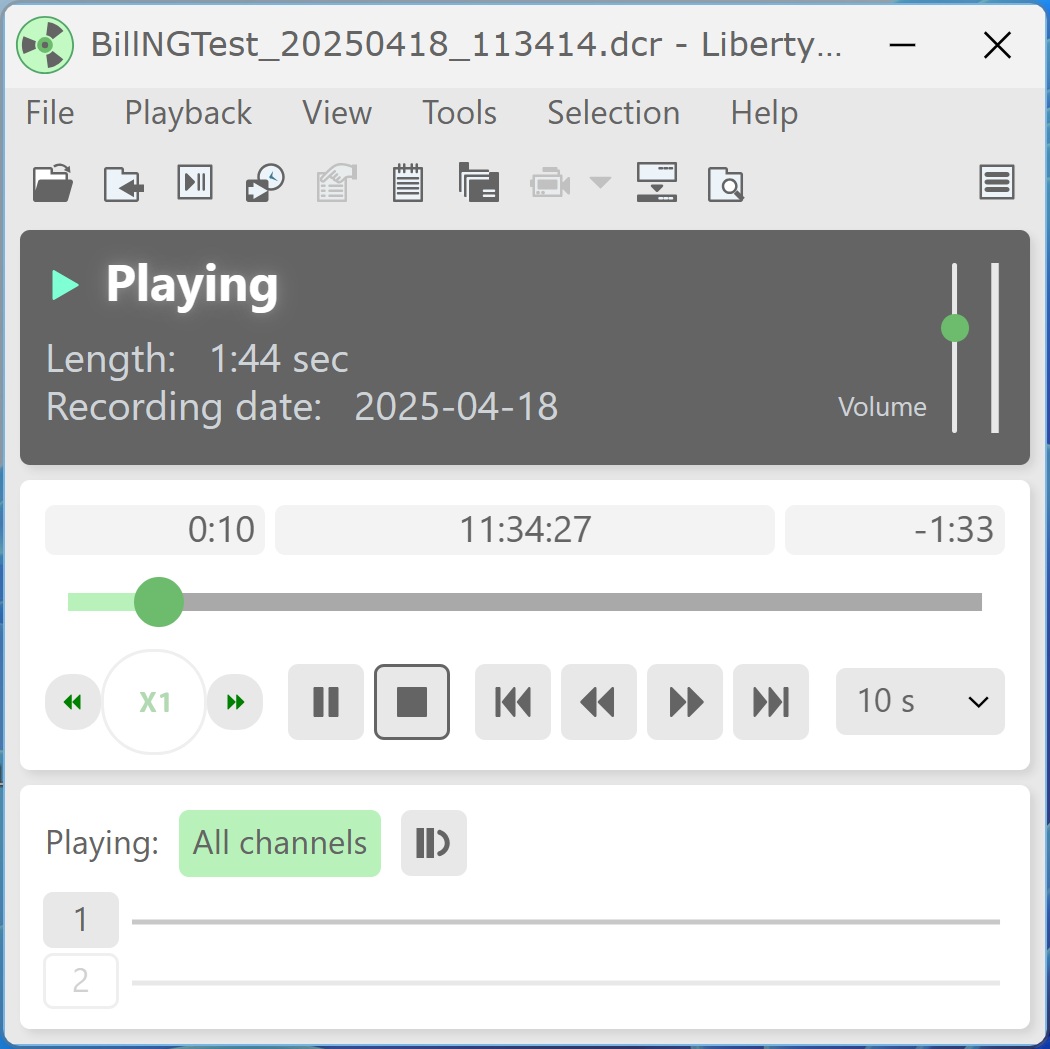
    In addition to the newly released Android Liberty Player v2.6 (now available for download from the Google Play Store), the desktop Liberty Player v3.0 introduces a new, modern user interface designed to make playback controls easier to access and recording file information easier to view.


    To install, download the ZIP file from the Support page and run the appropriate installer:


    For 64-bit installations, run LibPlay30-x64.msi.

    For 32-bit installations, run LibPlay30.msi.


    The v3.0 beta includes all features and functionality from previous versions of Liberty Player. The primary change in this release is the updated user interface.


    Users who prefer the former “classic” interface can switch back at any time by opening View > Options, selecting the General tab, choosing Advanced, and enabling the "Use Classic interface" checkbox.